MV Nova Lighting Plugin PRO Version (RPG MAKER MV)
A downloadable mod for Windows
The Nova Lighting Plugin Pro (v1.0.0)
By The Killer Gin
Most RPG Maker lighting plugins treat your map like a flat piece of paper.
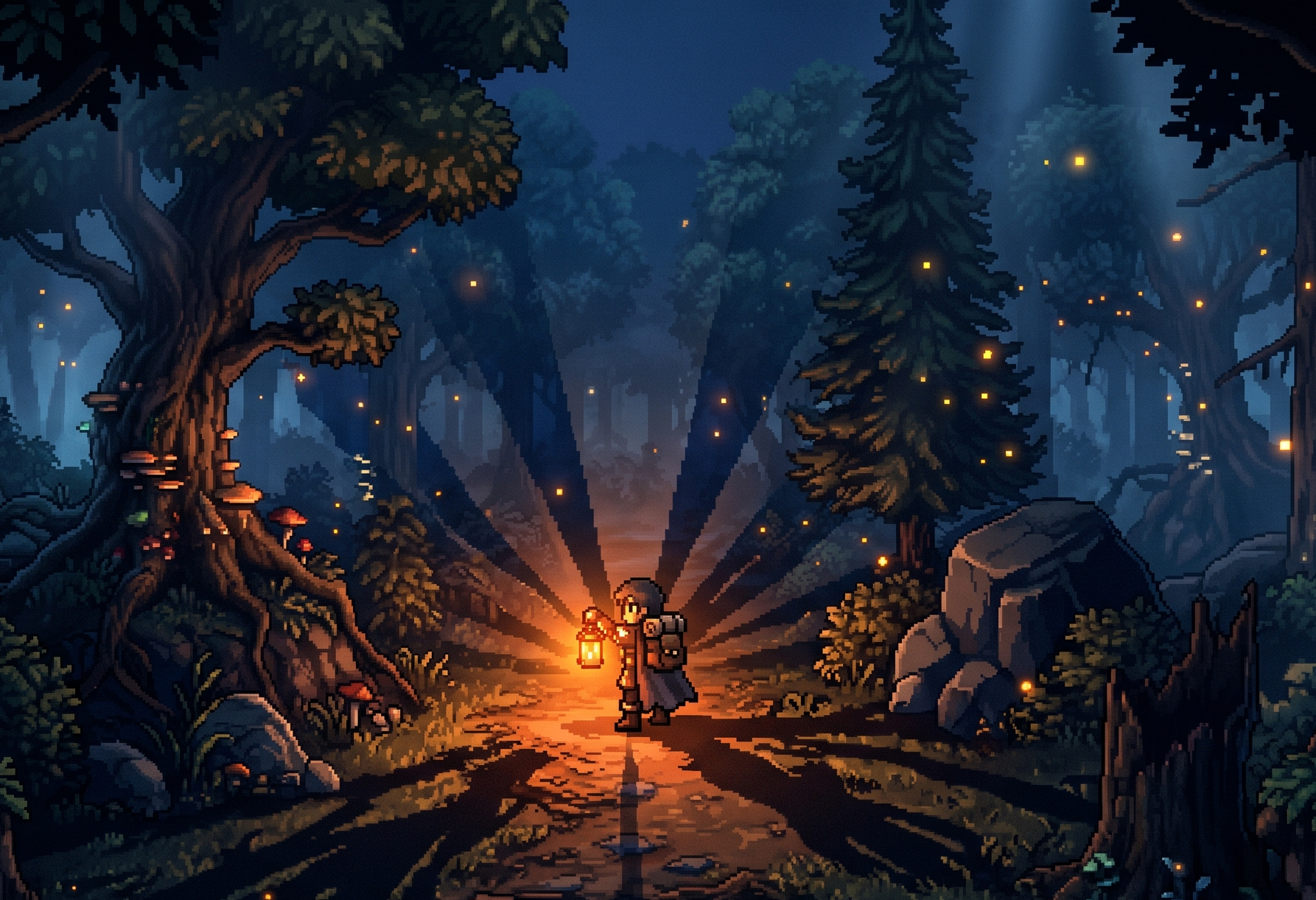
The MV Nova Lighting Engine Advanced turns your world into a living,
breathing 3D space. Featuring a custom Ternary Depth System, this engine
dynamically calculates the Y-axis of your player, events, and tiles to cast
seamless, volumetric shadows.
PRO Features:
* True 2.5D Volumetric Depth Engine implemented!
* Ternary Depth System (Voids, Walls, Objects).
* Volumetric Z-Push for seamless Y-axis illumination.
* Pixel-Perfect Event Silhouettes (Yanfly Spawner Compatible).
* Smart Event Notetag Overrides (<BlockLight>, <ShortBlockLight>).
* Smart Terrain Masking!
* Wind Engine Synchronization! (The Universal Wind Engine Plugin!)
* Aggressively Optimized: off-screen camera culling, conditional Z-sorting, and aggressive memory caching
Core Features:
- Blazing Fast Performance: Offloads rendering primarily to the GPU for silky-smooth framerates, making it ideal for low-end PCs and mobile exports.
- Seamless Yanfly Integration: Fully compatible with Yanfly's ecosystem, specifically designed to work flawlessly with Event Copier and Event Spawner.
- Dynamic Event Control: Every event features a reference to its own unique self-ID for precise, isolated light control.
- Customizable Flashlights: Includes X and Y offsets for directional lighting—perfect for horror games using custom character graphics!
- Terrax Legacy Mode: Instantly switch to a classic Terrax-style look with vastly superior performance, utilizing shared parameters for a pain-free migration.
Everything You Need to Start: Your download includes a fully configured PC Test Project. Jump in immediately to see the different lighting modes in action and learn how to set the foundations for advanced, highly interactive light mechanics in your own game.
Technical Specs:
- Tested on RPG Maker MV v1.6.2
- Requires PIXI.js 4.8.9 (Included in the download folder with easy installation instructions).
/////////////////////////////////////////////////////////////////////////////////////////
/////////////////////////////////////////////////////////////////////////////////////////
/////////////////////////////////////////////////////////////////////////////////////////
HELPER FILE!
(Now included in Plugin Manager!)
NOW COMES WITH DEMO PROJECT FOLDER FOR MV!
Look at the code in the Demo to see how it's done!
BASIC LIGHTING SETUP
To activate the script on a map, do the following:
- Put an event onto a map.
- In the 'Note' field (next to the name) put the following text: Light 250 #a25600
- 250 is the light radius of the object.
- #a25600 is a nice color for torches (Yellow/Orange in this case).
- #FFFFFF is pure white light (not recommended for regular light, but works great with the Terrax Legacy option enabled).
- For an evil red, try: #8F0C00
ADJUSTING INTENSITY: If you want a white light, it is best to reduce the intensity/alpha to 80%:
- Light 150 #FFFFFF -1 .8 (Radius 150, No ID, Intensity 80%)
- Light 150 #FFFFFF 2 .8 (Radius 150, ID 2, Intensity 80%)
TURNING LIGHTS OFF: To shut off a light entirely, simply reduce your radius to 0:
- Fire 0 #a25600
LIGHT IDS & PLUGIN COMMANDS
There are two flavors of lights:
1. LIGHTS WITH NO IDs (Default ON)
- Example: Light 250 #a25600 (No ID, Default ON, Intensity 100%)
- Example: Light 250 #a25600 -1 .9 (No ID, Default ON, Intensity 90%)
- Note: '-1' stands for no ID. Use this if you need to add an intensity value.
- Control: Use plugin command 'Light on' or 'Light off' from within the event.
2. LIGHTS WITH IDs (Default OFF)
- Example: Light 250 #8F0C00 2 (ID 2, Default OFF, Intensity 100%)
- Example: Light 250 #8F0C00 5 .8 (ID 5, Default OFF, Intensity 80%)
- Control: Use Plugin command 'Light on 2' (to target ID 2).
- Alternatively, use 'Light on' from within the event itself (it knows its own ID).
- Note: IDs are map-specific. You can assign the same ID to control groups of lights.
ADVANCED LIGHT MECHANICS (Common Events & Autoruns)
Because numbered ID lights default to OFF, they must be controlled dynamically. For advanced mechanics, it is recommended to use Autoruns and the included 'Izy_CommonEventOnLoad' script (please credit the original author).
- Create an Autorun on your map that turns ON Self-Switch D for all events.
- Use Self-Switch A to track if a light should be ON or OFF.
- Use Self-Switch D to run an Autorun event page that sets the light state:
- If Self-Switch A is ON: 'Light on'
- Else: 'Light off'
- Turn Self-Switch D OFF when complete.
SCRIPT CALL TO TRIGGER SELF-SWITCH D ON ALL MAP EVENTS: var m = $gameMap.mapId(); for (var s = 1; s < $dataMap.events.length; s++){$gameSelfSwitches.setValue([m, s, 'D'], true); }
Put this script in a Common Event. Call it via Map Autoruns and your Game Load script.
PLAYER LIGHTING & FLASHLIGHTS
PLAYER RADIUS:
- Change size/color: Light radius 200 #a25600
- Change slowly (dying torch): Light radiusgrow 200 #a25600
- Change with intensity: Light radiusgrow 200 #a25600 .8
FLASHLIGHTS:
- Player Flashlight: Flashlight on 8 12 #FFFFFF (8 = length, 12 = width)
- Turn Player Flashlight off: Flashlight off
- Event Flashlight (With ID 3): Flashlight on 8 12 #FFFFFF 3
MAP TINTING
- Set Default Daylight: Use '0xffffff' in the plugin options.
- Set Tint instantly: Tint set #333333
- Fade Tint: Tint fade #777777 5 (Fades to new color at speed 5. 1 = Fast, 20 = Slow).
VISUAL OPTIONS & PERFORMANCE
FIRE FLICKER:
- Replace the word 'Light' with 'Fire' in your note tag to add a subtle flicker effect.
TERRAX LEGACY MODE:
- If Nova lighting is too intense, turn on the "Terrax Legacy" plugin option.
- This reverts the visual style to standard Terrax lights. Leave light intensity at 100%.
PERFORMANCE TIPS:
- Lower the bitmap resolution in the plugin options to reduce CPU/GPU strain.
- Lights placed very close together require more computation.
YANFLY COMPATIBILITY
This Plugin is fully compatible with Yanfly Copy Event and Spawn Event. It is highly recommended to use these plugins to maximize your mechanics.
Video Links:
* Link to Yanfly Copy Event (Highly Recommended!):
* Link to Yanfly Spawn Event (Highly Recommended!):
STYLE SWITCHING (In-Game)
You can seamlessly switch between Nova Lighting Style and Terrax Style at any time during gameplay using the following Script Calls:
- Change to Terrax Style: Anisoft.Nova.TerraxLighting = true;
- Change back to Nova Style: Anisoft.Nova.TerraxLighting = false;
TILE SHADOWS (TERRAIN TAGS)
You can set comma-separated Terrain Tags in the Plugin Parameters to classify how tiles cast shadows:
- VOID TAG (Default 7): Infinite depth. Pure black. Absorbs all light.
- WALL TAG (Default 6): Scans down endlessly to merge connected walls.
- OBJECT TAG (Default 5): Smart standalone objects. Breaks shadows if it detects stacked bases (e.g., a rock sitting below a wall).
EVENT NOTETAGS & SMART OVERRIDES
The engine clones the exact texture of your events to cast pixel-perfect shadows! Place these tags in an Event's Note Box OR an active Page Comment:
<BlockLight> : The event casts a pixel-perfect, towering shadow.
<ShortBlockLight> : The event casts a shadow, but acts like a short 1-tile object (allowing light to shine over the top of it).
<DontBlockLight> : Instantly destroys the shadow.
HIERARCHY OVERRIDE:
Active Page Comments ALWAYS take priority over the global Note Box! If you have <BlockLight> in the main Note Box, but you add <DontBlockLight> to a specific Event Page's comments (e.g., a destroyed pillar), the shadow will instantly vanish when that page activates.
Events on Walls
Change Priority to ABOVE CHARACTER if you want the light to show on top of the wall.
PLUGIN COMMANDS
You can dynamically toggle the heavy 2.5D lighting features mid-game to save performance in massive cities, or turn them back on for intense, atmospheric puzzle rooms.
* nova depth off - Instantly kills 2.5D shadows (flat lighting).
* nova depth on - Restores volumetric 2.5D shadows.
* nova pixel off - Reverts tile shadows to optimized blocky squares.
* nova pixel on - Restores pixel-perfect map masking.
TERMS OF USE
- You must credit "The Killer Gin" in your game's credits page.
- This is a commercial plugin. You must have purchased this plugin on Itch.io to use it in your project legally.
- You are free to edit and patch the code to suit your project's needs.
- The code (whether modified or unmodified) may not be redistributed or resold.
Please report to thekillergin@gmail.com if you find someone distributing this code without permission.
Special thanks to everyone in the RPG Maker community for the ideas, support, and interest!
Purchase
In order to download this mod you must purchase it at or above the minimum price of $15 USD. You will get access to the following files:
Development log
- Version 1.0!!!!13 hours ago
Leave a comment
Log in with itch.io to leave a comment.